
How to flash Samsung phone using Odin Tool/Software [Tutorial]
How to flash Samsung phone using Odin Version of all models
- Before flash a phone install latest Samsung USB driver according to your windows
- Download Odin Flashing tool and extract to your desktop
- Turn Off your phone and press volume down key, home key, and power key
- your mobile Phone is asking volume up to continue
- Please Press Volume up key to continue Phone in downloading mode Read More
How To Flash Samsung Phone Via Odin With Screenshot Step By Step
Step:1 Open Odin tool With Double Click on Odin 3 v3

Step 2: Click PDA or AP to Firmware that you have Firmware Folder
![[Tutorial] How to flash samsung phone using odin Tool](https://1.bp.blogspot.com/-v6ODLELRakY/WA4zogHb9yI/AAAAAAAAJ38/g5VWUwwyQ9oPDuqJab2QS9z4g3ssYZ84QCLcB/s1600/1.jpg "[Tutorial] How to flash samsung phone using odin Tool")
Step 2: select the firmware find in firmware folder example gt-i9300
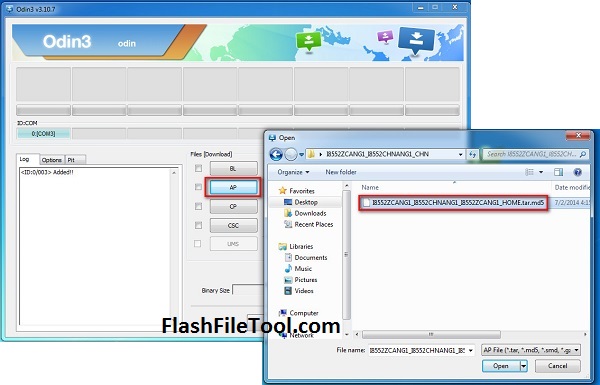
Step 2: After Select Firmware Please Click The start button Now flashing is started

WARNING DO NOT REMOVE USB CABLE ON YOUR MOBILE PHONE UNTIL FINISHED OR FAILED IS SHOWED ON ODIN.
Congratulation Flashing Is Done Successfully

Incase failed flashing or seen any error , TRY TO THIS FOLLOWING OPTION
Try these Steps first:
- Please verify Phone model and firmware model name
- Check USB driver are installed successfully, or update usb driver
- Check usb cable (Use Original Cable For Flashing And unlocking)
- Restart your computer. Run Odin as Administrator.
- Try To different firmware but same version of the phone model